Theme Layout

Boxed or Wide or Framed

Theme Translation

Display Featured Slider

Featured Slider Styles

[Boxedwidth]

Display Grid Slider

No

Grid Slider Styles

[style1][caption2]

Display Trending Posts

No

Display Author Bio

Display Instagram Footer

Powered by Blogger.
My Mini Shopping Spree and I've Been Caught Reading

My Mini Shopping Spree and I've Been Caught Reading


I have been having such a wonderful time at the I Teach K conference this week!  I have seen so many great presenters and have learned so many things that I can bring right into my classroom.  I plan on doing a post about my highlights later in the week.

I have felt bad for all of the fellow Kindergarten teachers who have had to deal with the Las Vegas heat.  It's been very, very warm and when I say warm, I mean HOT!  My husband took this picture of his car yesterday.  Thankfully, the car I drive now doesn't have a thermometer.  I would rather not know.

Yes, that says 119.
Yesterday was the big blogger meet-up.  Unfortunately, I was unable to go.  We have dinner every Tuesday with my husband's family.  It's a nice time to relax and visit, and I don't like to miss it.  So anyway, after dinner was over, I did a mini shopping spree.  I haven't done a lot, well really any, school shopping this summer.  It's about time I started.  lol

First I went to Target to check out the Dollar Spot.  It's been a whole week since I've checked it out. {Trust me, that's a long time between visits during the summer.}

Here are my goodies I picked up.
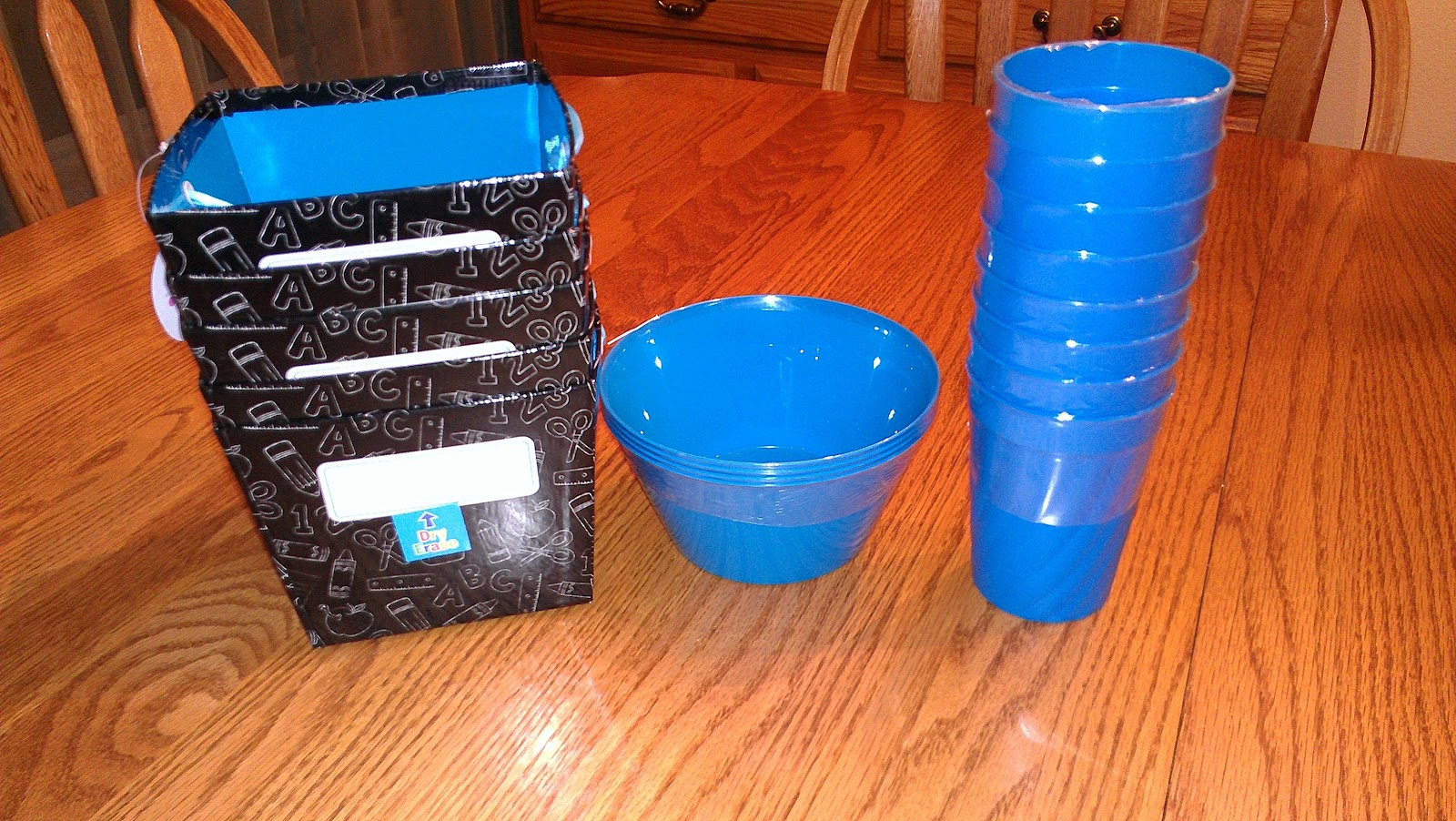

Aren't those the cutest little containers?  I love that the ribbon and the inside of the containers are blue.  They match my classroom perfectly.  To be honest, I have a lot of the blue bowls at school, but it never hurts to have extra.  I'm not sure what I'm going to do with the cups, but I'm pretty sure that I will have to go back and get more.


The three black containers are magnetic. I plan to put them on my magnetic marker board near my teaching area to hold all of those little things that you always need, but can never find.  The blue strip is magnetic also.  I'm still trying to think of a great way to use it.  The duck tape was not in the  dollar spot, but I needed it none the less.  I just couldn't resist.  I mean it's blue with white polka dots - it matches everything else.  lol


The dollar spot also had these cute puzzles.  I love having puzzles available for my students to use in the classroom.


This is actually not for me.  I bought 3 of these for Colton's teacher and assistants as part of their end of ESY gifts.  Because Colton uses sign language, I thought these would be perfect for them.  There were several different pens that had the hands doing other things, but I can't remember what they were.

I then had to go to Staples to buy replacement cartridges for my printer.  For some reason, it seems like ink runs out so much faster when you print lots of stuff off.  Who knew?

As I was walking around I found these.


If you read my post on my favorite resources, you may remember that I said I loved Bic pens.  I also said I wished that I had some green ones.  I was so excited when I saw these last night!  My husband did not get my excitement when I showed them to him later.  I'm not quite sure why.  lol

I had so much finding things for my classroom last night.  I finally feel like I'm getting ready for the new year.  Shopping always does that for me.  :)

Tori over at Tori's Teaching Tips is having a very fun linky giveaway.


The idea is to get "caught" reading in different places.  Well, I knew I wanted to participate, but wasn't sure what I wanted to do.  That is until Saturday.  We decided at about 8 pm Friday to go to Disneyland for the weekend.  {Love annual passes.}  This is my entry for where I got caught reading.  {Please excuse how bad my hair looks.  We rode Splash Mountain right before this.}

Riding Big Thunder Mountain Railroad at Disneyland.

Try to think of a fun place to get caught reading and join in on her linky.  So much fun!
Read more »
Amy
5 Comments
Happy Blog Hopping Day!

Happy Blog Hopping Day!


I am all about blog hopping and today is International Blog Hopping Day!  I didn't even know such a day existed until I  {wait for it} blog hopped.  lol

Kreative in Kinder is hosting the linky party for the Freebies portion of TBA's International Blog Hopping Day.  I decided to link up, because after all, who doesn't love a freebie {or 100}?


Follow for Freebies

I am sharing a new freebie that I made just for this blog hop.  I hope you enjoy it!

Click on the picture to grab your copy.  
Now, go check out all of the other wonderful freebies over at Kreative in Kinder and have fun blog hopping!


Read more »
Amy
0 Comments
Happy Fourth of July and a Freebie

Happy Fourth of July and a Freebie


I want to wish everyone a very Happy Fourth of July!  I hope that everyone has a fun and safe holiday!

The Fourth of July is a very special day in my family.  Both my parents and my in-laws were married on the Fourth of July.  My parents are celebrating their 42nd anniversary today and my husband's parents are celebrating their 48th anniversary.  In honor of my parents and in-laws, I made some graphics in red, white, and blue.  This packet includes three circle tags, three 5x7 frames, and five papers.  Click on the picture to get your set.  I hope that you enjoy them!


Read more »
Amy
2 Comments
Organizing My Classroom Library Part 2

Organizing My Classroom Library Part 2


Yesterday, I posted about how to use the Classroom Organizer online.  Today, I am going to share with you how you can use an app on your smartphone to add books to your online library.

The very first thing that you have to do is, of course, download the free app from either Google Play {for Android phones} or from the iTunes Store {for iPhones}.  I have an Android so all of my pics will be from an Android phone, but I'm sure it doesn't look too different on an iPhone.


After you download the app, you can sign in and get started right away.


Once signed in, you will get a screen that looks like this. {Please ignore the fact that this screen shot looks a little different than the rest of the screen shots.  Apparently, I forgot to do this one last night and my husband updated my phone today.  lol}


You will need to find the bar code on the back or inside cover of the book.  Once you find it, you will need to hit the scan button.  You will also need to have a generic bar code scanner, but that is another free app.  {I want to thank my husband for taking the next picture.  It was hard to explain to him why I wanted a picture of me using my phone.  lol}


Once the bar code scanner recognizes the code, it should look like this.  Just as a warning, you may have to scan a couple times and sometimes it may not come up at all.  Those books that didn't come up with a title were just put into a second pile for me to manually enter the ISBN number in by hand.


Once you get a screen that shows a title, you just hit the Add to Library button and it will join your other titles in your library. Be careful to only hit the button once.  There were a couple times that I accidentally hit the button twice and it added two copies into my library.  It was easily corrected by going online and deleting the title and rescanning.

I hope this gives you more information on how to use the Classroom Organizer app.  I love using it!  Even though it doesn't add 100% of your books to your list, it does add enough to make it worth it for me.

Read more »
Amy
4 Comments
Organizing My Classroom Library Part 1

Organizing My Classroom Library Part 1


No time, no blog.  It has been a very busy week and a half.  This whole cleaning the house thing and taking my son to school {ESY} has kept me away, but I am now back and ready to rejoin the blogging world.

If you read my Summer Bucket List, you may remember that one thing that I planned on doing this summer was organizing my classroom library.  On my teacher work day, I gathered all most of my books up and put them in my car and brought them home.  My husband was not happy so excited to see all of my books come home.  haha

Well, my last day of work was June 8th.  I just took out half of my books yesterday.  Oops.  The others were taken out by my husband about a week ago.

Still in my car three weeks after I put them in. lol

The ones my husband took out.
So I grabbed a bucket {the green one in the second picture as a matter of fact.}, and brought it inside.  I opened up my Classroom Organizer page and got to work.  

I will show you how to add books online today.  Tomorrow I will show you how to add books using the Classroom Organizer app on my smartphone. 


It's very easy to set up your own account.  Click on Create Your Account and then follow the directions given.  


Once you have signed in, you will need to go to your Teacher Page to add books.   


To type in the ISBN number, first find the number on your book.  Then type it in to the Quick Add box and click Add.  


This will then pop up on your screen.  If you do not like the You can modify what columns you want by going to Edit Columns button above your book list.  


This is what your options will look like.  Be warned though, I found out that some of the choices are not that great.  The bucket that I was working on was my AR books with levels between 2.5-2.9 and by clicking on the AR choice, only a few books came up as AR.  The biggest reason I wanted to use this program was to make a master list, so I don't mind that some of the information does not come up.  Others may be a tad disappointed in that.  You can always add grade levels, AR levels, etc. by clicking on the edit button in the first column of your list. 


Once you have added your books into the computer, you can then export them into an Excel document. This is what my list looked like after I added a few books in.  


I know that I will enjoy having this list for several reasons. First of all, I will know if I have already purchased a certain book before.  Secondly, I will be able to keep this list at home and school so that I can plan better.  Finally, I just like seeing what books I have.  I love children's literature and it gives me joy to have so many great titles for my students to use.  

I hope you have enjoyed Part 1 of using Classroom Organizer from Booksource.  

On a personal note, I wanted to share what my family did today.  Each month, AMC Movie Theaters has a sensory friendly showing of a kid friendly movie so that children with Autism and their families can enjoy a movie.  They turn the sound down and the lights are up a little bit.  Children are able to talk to their parents or walk around.  Today they showed the new Pixar movie Brave.  Colton has a really tough time with movies. {Seriously, it's in his IEP that he's allowed a different activity if he has a hard time with a movie in class.}  We prepped him by showing him the preview at home for several days in a row.  It was such a great experience!  We got to go to the movies as a family and Colton loved the show!  If you would like more information about sensory friendly movies, please click here.  Thanks!

Read more »
Amy
3 Comments
Winner!!!

Winner!!!


Thank you to everyone who entered my giveaway for the $25 gift certificate for Teachers Pay Teachers and two items from my TpT store!  The winner is:


Karen you will be receiving an email shortly!  For everyone who did not win, I am going to have my TpT store on sale for 20% off today only.   Thanks again for making my first big giveaway a success!
Read more »
Amy
1 Comments
End of Year Portfolios {And Some Other Stuff}

End of Year Portfolios {And Some Other Stuff}


First of all, I want to thank everyone who has entered into my giveaway!!!  I tried to thank everyone who wrote a comment personally, but blogger isn't letting me for some reason.  Not sure why...hmmm.  I'm going to try again later so hopefully it will work then.  If you have not entered yet, click the picture and it will take you there.  :)


Secondly, have you ever had one of those days that just feels weird?  Well, that was today for me. Even though I have already been off from school for a week, I haven't really had any "down" time.  Today made up for that.  I was at my house all by myself and it felt very strange.  My husband was at work {not so strange actually lol}, today was my son's first day of summer school, and my dog was getting her teeth cleaned.  I can't tell you the last time I was home alone.  It was just too quiet.  After teaching Kindergarten, one would think I would relish in the quietness.  Not me.  I couldn't wait to pick up my son from school and my dog  from the vet.  It feels normal in the Lattin household again - cartoons on and a dog barking.  :)  And just because I think my dog is the cutest thing ever, here's one of my favorite pics of her.  

Monet
Ok - I think I'm ready to write about what's in the title now that I've gotten all of that out of my system. :)

 I wanted to share the portfolios that I sent home with each student at the end of the year.  Every year, I save items that the students have completed throughout the year.  I usually just have the students color a manila folder and put everything in there.  This year I took the torn paper names projects that we did in September and stapled a plain piece of construction paper to the back.  It made a nice pocket for all of the projects I saved.  Here is an example of a portfolio that was stuffed and ready to go home.


I made sure to add the memory book that I blogged about here.  The books looked great bound together.  I love how different her August and April self-portraits looked.  :)


Here is a picture of all the other goodies inside the portfolio.  Just looking at the picture reminds me of all the fun we had this year.  From the torn paper apples we made in September to the flag hearts we made in May, all of the projects bring back so many great memories.  I could tell you a story about every piece of paper and project in there.  I hope the parents enjoyed looking through their child's work and were as proud of them as I am.  :)


I hope you enjoyed seeing how I shared my students' work with their parents.  I loved how they turned out!  How do you share your students' work at the end of the year?  I would love to hear what you do for your students.  

Read more »
Amy
0 Comments
[name=Amy] [img=https://blogger.googleusercontent.com/img/b/R29vZ2xl/AVvXsEi8opOb6CXLrHo0N35nhAKwfMwwr4XjsDuyQwpzCMrC-i8DcX-tofRWOZv2nsIx9CFxyfSYuffwMApjKXX_ll1U4eKQlKQxJQOjdlMMJVqNpVwnKiNAaa-FTpUIa99ZdsqRVQVt2KhvPA/s1600/amy.jpg] [description=Hi! I am Amy, a primary teacher with over 20 years experience. I'm excited to share ideas, tips, and tricks to help make your teaching sweet!]

Follow @teachingissweet